You have heard that ChatGPT can translate in real time. Now you need to call someone who speaks another language — a landlord, a clinic, a client — and you wonder if ChatGPT can handle the call for you.
The short answer is no, not in the way you hope. ChatGPT can help with parts of the same job, but a phone call is a different job from a chat with an AI. This article shows exactly where the line is, and what to use instead when you need to call a real person.
Quick Answer: No. ChatGPT cannot translate a live phone call. It has no way to dial a number or join your call. It can translate a face-to-face conversation through Voice mode. For a real phone call, use a call translation app like AI Phone, which dials the number and translates both sides live.
What ChatGPT Can Translate
ChatGPT translates in three ways:
Voice Mode in the ChatGPT App
Open the app, tap the Voice button, and ask it to translate between your two languages. OpenAI added this to Voice mode in June 2025: once you ask, it keeps translating until you tell it to stop or switch languages. Since July 2026, Voice runs on GPT-Live, a model that can listen and speak at the same time. OpenAI says it can “even perform live translation.” In practice, it is for two people in the same room: you hold one phone between you, one person speaks at a time, and the phone speaks the translation out loud.
Typed Text by Prompt
Paste a message into a chat, name the two languages, and you get the translation back. It helps before a call: writing out what you want to say, or translating messages and email. It does not help during a call.
ChatGPT Translate
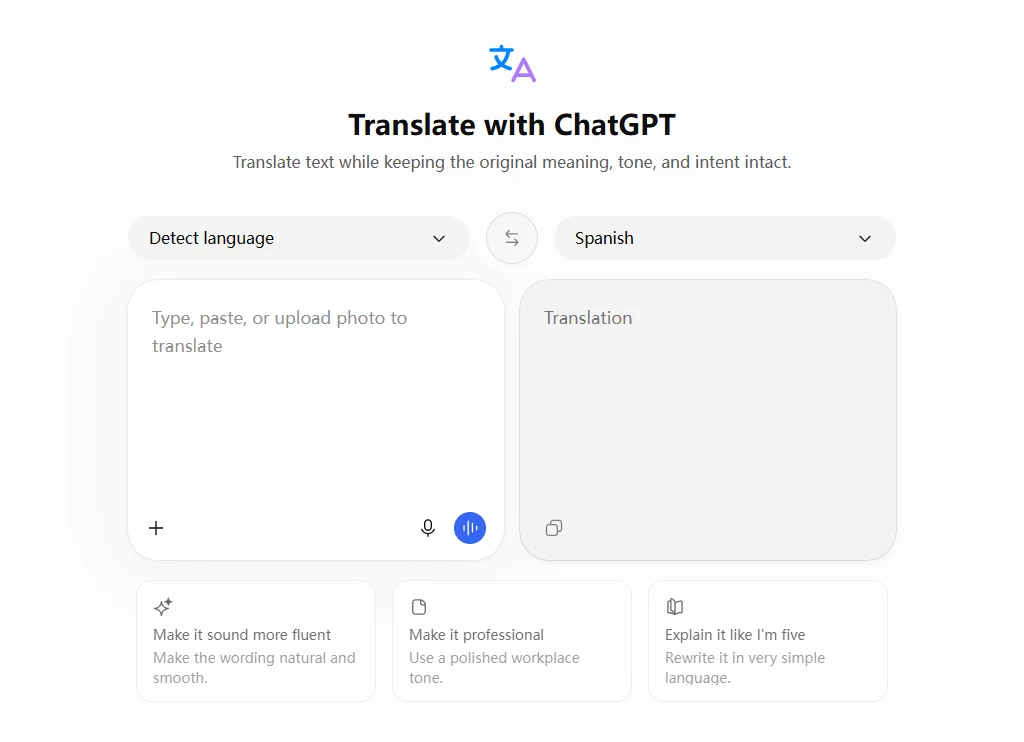
OpenAI also offers ChatGPT Translate. It launched in January 2026 and is free on the web. It works like a regular translator: you pick the two languages and get the translation. It accepts typed text, photos, and speech, in 40+ languages.
All three share one limit: none of them can dial a number or join a phone call.
Why ChatGPT Cannot Translate a Phone Call
A phone call is audio between two phones. ChatGPT lives in an app on your phone. It is not in the call, and it has no way to get in.
- It cannot dial a number. ChatGPT has no calling feature. You cannot ask it to call a landlord, a clinic, or a client.
- It cannot join a call in progress. Once you are on a normal phone call, a WhatsApp call, or FaceTime, ChatGPT cannot hear the other person. The audio stays inside the call.
- It cannot hear the other side clearly. The only sound ChatGPT can pick up is what comes out of your phone’s speaker and into its microphone. That is not a connection to the call. It is a recording of your room.
Some people try a workaround: put the call on speaker and let ChatGPT listen on a second phone, or on the same phone. It works for a sentence or two, but it is not a way to hold a real conversation. Room noise and echo confuse it, the delay grows while the AI listens and then speaks, and the other person hears a strange voice from a speaker. They may hang up, or they may not know they are being recorded. The same limit applies to WhatsApp and FaceTime calls: ChatGPT cannot get inside those calls either.
What About Calling ChatGPT on the Phone?
Yes, you can call ChatGPT on the phone. Dial 1-800-CHATGPT (1-800-242-8478) from a US or Canadian number and you talk to ChatGPT by voice, with no account needed. OpenAI gives you 30 minutes a month free. You can also message ChatGPT on WhatsApp at the same number.
The catch is who you are calling. You are calling ChatGPT. The AI is the person you talk to. It cannot then call someone else for you, or connect your call to a third person.
That still makes it useful around a call. Before you dial, ask it to write out the key sentences you need in the other language, or practice saying them. During a break in the call, you can ask it for a word you are stuck on. What it cannot do is translate the call for you while you talk.
ChatGPT vs a Phone Call Translator
ChatGPT and a phone call translator are built for different jobs. The table shows the difference in one place.
| ChatGPT Voice | AI Phone | |
|---|---|---|
| Dials a real phone number | No | Yes — any mobile or landline |
| Translates both sides during a call | No | Yes, live |
| Other person needs an app | Not applicable — there is no call | No |
| Call summary after the call | No | Yes |
| Best for | Face-to-face talk and practice | Real phone calls with another person |
How to Translate a Real Phone Call Instead
AI Phone is built for phone calls. It translates the conversation in real time, with bilingual subtitles on your screen. It can dial mobile or landline numbers, and the person you’re calling does not need to install AI Phone.
To get started:
- Open AI Phone and Dial. Go to the Call tab, and enter the number you want to call.
- Choose Languages and Voices. Select your language and the other person’s language, then choose the translation voices.
- Start the Call. Start the translated call and speak naturally in your language.
- Review the Conversation. After the call, check the transcript and summary to revisit important details.
Other ways to translate a call exist if your phone or carrier already supports them. Some phones translate regular calls inside their own phone app. T-Mobile’s Live Translation is a carrier service in beta that translates a normal phone call on the network. These work when your device or plan covers them. AI Phone is the option that works on any phone.
When a Human Interpreter Is Still the Safer Choice
AI translation is not perfect. For a call where a mistake could cost you money, affect your health, or change a legal outcome, use a human interpreter instead.
- Medical, legal, and money calls. A doctor’s office, a lawyer, a bank, or an insurance claim is worth a professional interpreter. The interpreter can ask questions when something is unclear, and they know the right words for the subject.
- How it works. You call an interpretation service, pick your language, and the service joins the interpreter to your call. A three-way call works with a landline on the other end too.
- What it costs. You can also hire a phone interpreter yourself. It usually costs $1.25 to $4.00 a minute, and the price depends on the language.
For everyday calls, like a landlord, a shop, or a school office, AI translation is usually enough. For a call where the stakes are high, a person is still the safer choice.
Frequently Asked Questions
Can ChatGPT translate a phone call in real time?
No. It can translate a face-to-face conversation in real time through Voice mode, but it cannot dial a number or join a phone call. For a real call, use a call translation app.
Can ChatGPT call a phone number?
No. ChatGPT has no calling feature. You can call ChatGPT at 1-800-CHATGPT, but that is a call with the AI, not a call the AI makes for you.
Can I put ChatGPT on speaker during a call?
You can, but it works poorly: noise, echo, and delay, and the other person hears the AI voice. It suits a sentence or two, not a full conversation.
Can ChatGPT translate WhatsApp or FaceTime calls?
No. It cannot get inside those calls either. A video call needs a tool built for it, such as a video call translator that joins both people through a link.
Final Thoughts
ChatGPT is a strong translator for face-to-face talk and for text. A phone call is a different job: it needs a tool that dials the number and translates while you talk. Pick the tool for the job, and check the numbers before you hang up.
Need to make a call in another language?
AI Phone translates the call live. The other person just answers a normal phone.